
Disclosure: This post contains affiliate links. If you purchase through our links, we may earn a small commission at no extra cost to you. We only recommend products that meet Insitelane’s editorial standards.
If you’re buying a monitor arm, one specification you shouldn’t ignore is VESA compatibility.
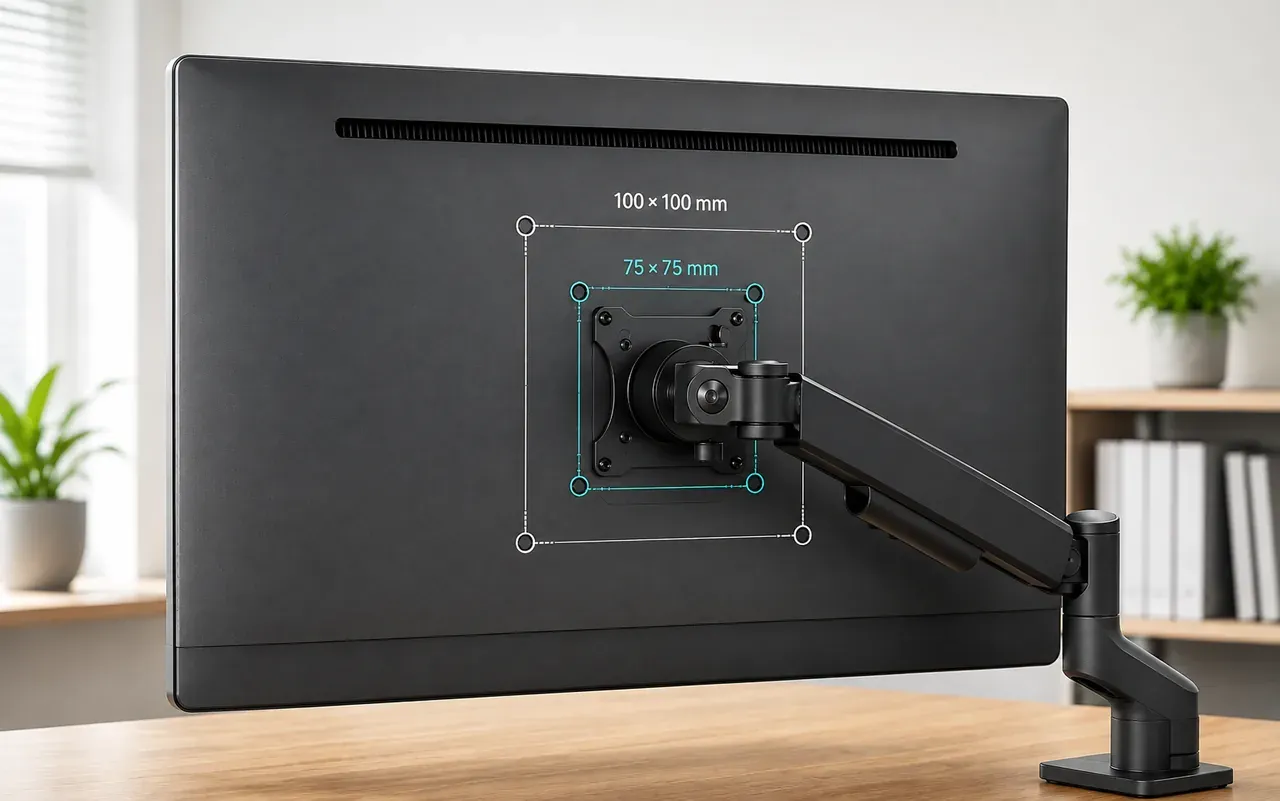
You may see measurements such as 75×75 mm or 100×100 mm on a monitor or monitor arm. These numbers aren’t about screen size. They describe the spacing between the mounting holes on the back of the monitor.
Understanding VESA makes it much easier to determine whether a monitor arm will actually fit your screen.
What Does VESA Mean?
VESA stands for the Video Electronics Standards Association, an industry organization that develops standards for display mounting and other technologies.
For monitor mounting, VESA specifications define standardized hole patterns on the back of compatible displays.
The most common patterns you’ll encounter with smaller and mid-sized computer monitors include:
- 75×75 mm
- 100×100 mm
The first number represents the horizontal distance between the mounting holes, while the second represents the vertical distance.
What Does 75×75 mm Mean?
A 75×75 mm VESA pattern means the mounting holes are spaced 75 mm apart horizontally and 75 mm apart vertically.
If your monitor has this pattern, you’ll need a compatible monitor arm or mounting plate.
What Does 100×100 mm Mean?
A 100×100 mm VESA pattern means the mounting holes are spaced 100 mm apart horizontally and 100 mm apart vertically.
This is another common mounting pattern on computer monitors.
How Do You Check Your Monitor’s VESA Pattern?
Before buying a monitor arm, check the back of your monitor.
Look for four threaded mounting holes arranged in a square or rectangular pattern.
If your monitor documentation lists something such as VESA 75×75 or VESA 100×100, you already have the information you need.
If the specification isn’t immediately available, check:
- Your monitor’s manual
- The manufacturer’s product specifications
- The monitor’s rear mounting area
Do not assume that every monitor supports VESA mounting.
Does Monitor Size Tell You the VESA Pattern?
No.
A 24-inch monitor doesn’t automatically have one particular VESA pattern, and the same applies to 27-inch or 32-inch monitors.
VESA compatibility should therefore be checked separately from screen size.
This is why a monitor arm listing can say it supports 13–32-inch monitors while also specifying 75×75 mm and 100×100 mm VESA compatibility.
VESA Compatibility Is Only One Check
Finding the correct VESA pattern doesn’t automatically mean the monitor arm is suitable.
You should also check:
Monitor Weight
The arm must support the monitor’s weight.
Check the monitor’s weight without its original stand and compare it with the arm’s supported weight range.
Screen Size
The monitor should fall within the arm’s stated screen-size range.
Desk Mounting
Check whether your desk is suitable for the arm’s C-clamp or grommet mounting system.
Monitor Design
Some monitors have recessed or unusual mounting areas. Check the monitor and mounting hardware before assuming compatibility.
VESA vs Monitor Size: Don’t Confuse Them
These specifications answer completely different questions.
Specification | What It Tells You |
Screen Size | How large the display is |
VESA pattern | Whether the mounting holes match |
Weight capacity | Whether the arm can safely support the monitor |
Mounting method | How the arm attaches to the desk |
A monitor can meet the screen-size requirement but still fail the VESA requirement.
That’s why checking all four matters.
Common VESA Buying Mistakes
Assuming every monitor is VESA-compatible
Some monitors don’t have standard mounting holes or require a separate adapter.
Checking only screen size
A monitor arm that supports 32-inch screens isn’t automatically compatible with every 32-inch monitor.
Ignoring monitor weight
The arm’s weight rating matters just as much as VESA compatibility.
Forgetting the desk
Even if your monitor fits the arm, the mounting system still needs to work with your desk.
Quick Checklist Before Buying a Monitor Arm
Before you order, check:
- ✅ VESA pattern
- ✅ Monitor weight without stand
- ✅ Supported screen size
- ✅ C-clamp or grommet compatibility
- ✅ Desk thickness
- ✅ Required adjustment range
If all of these match, you’re much less likely to end up with a monitor arm that doesn’t work for your setup.
Final Word
VESA compatibility is one of the simplest specifications to understand—and one of the easiest to overlook.
Remember:
75×75 and 100×100 refer to the spacing between mounting holes, not the size of your monitor.
Before buying a monitor arm, check the VESA pattern first, then confirm the monitor’s weight, screen size and desk compatibility.
A few minutes of checking can save you from buying the wrong mount.